
There is something genuinely frustrating about working late at night and not being able to see your keyboard properly. I have been there countless times, squinting at my keys while trying to finish an important project, knocking over my coffee mug because I reached for the wrong spot in the dark. That was my reality until I started looking for a solution that would not break the bank or clutter my desk with more cables than I already had.
The market for wireless keyboards has exploded in recent years, with options ranging from basic $20 models to premium mechanical boards costing upwards of $200. For someone like me who works from home, types for eight to ten hours daily, and occasionally enjoys gaming sessions after work, finding the right balance between functionality, comfort, and price became a personal mission. I needed something with backlighting for those evening hours, wireless connectivity to keep my workspace clean, and enough battery life so I wouldn’t be hunting for charging cables every other day.
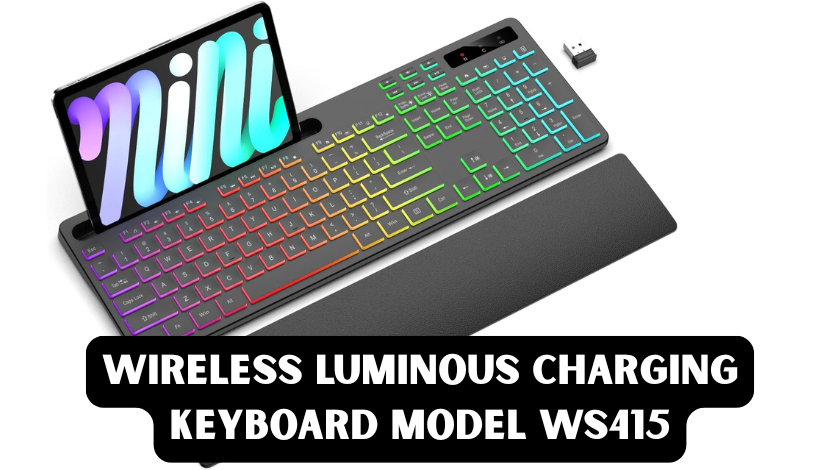
After testing several options and reading through what felt like hundreds of reviews, I landed on the Soueto WS415 wireless RGB backlit keyboard. What caught my attention initially was not just the RGB lighting, which seems standard these days, but the combination of features that addressed real problems I was facing: the integrated phone holder, the ergonomic wrist rest, and the rechargeable battery that promised to eliminate my constant battery replacement routine.
What Makes the WS415 Different from Other Budget Wireless Keyboards
Most wireless keyboards in the sub-$50 category focus on one thing and do it adequately, while sacrificing everything else. You might get a basic wireless connection with no backlighting, or you might get backlighting that drains disposable batteries within weeks. The WS415 takes a different approach by bundling several quality-of-life features that usually appear in more expensive keyboards.
The keyboard features a full-size layout with a numeric keypad, which might sound obvious but is increasingly rare in compact-focused modern designs. As someone who regularly works with spreadsheets and data entry, losing the number pad was never an option. The keys use a scissor-switch mechanism rather than mechanical switches, which significantly reduces noise. My partner works in the same room, and my previous mechanical keyboard created tension during conference calls. The WS415 produces a soft, muted sound that does not travel across the room.
The build quality surprised me, given the price point. The keyboard has a slight weight that prevents it from sliding around on the desk, and the plastic construction feels sturdy rather than flimsy. After three months of daily use, including twice in my laptop bag, there are no signs of wear on the key legends or the body.
Understanding the RGB Lighting System and Why It Matters
The “luminous” aspect of this keyboard refers to its seven-colour RGB backlighting system with four different lighting modes. Now, I will be honest: when I first saw “RGB” in the product description, I assumed it was gimmicky gamer lighting that would distract more than help. I was wrong about its utility.
The backlighting serves a practical purpose for anyone who works in dimly lit environments. The seven colour options, red, blue, green, yellow, purple, cyan, and white, allow you to choose a hue that matches your preference or reduces eye strain. I personally switch between white during daytime work and a soft blue in the evenings, as I find blue light less harsh than white when my eyes are tired.
The four lighting modes include static colour, breathing effect, reactive typing (where keys light up when pressed), and a cycling rainbow effect. For productivity work, I keep it on static with medium brightness. The breathing mode is subtle enough not to be distracting, but it adds a nice ambience during video calls. The reactive mode actually helps me type faster because it gives me visual confirmation of each keystroke, which provides satisfying feedback during long writing sessions.
Brightness is adjustable across three levels, and you can turn the lighting off completely to save battery. This flexibility matters because backlighting is typically the biggest battery drain on wireless keyboards. Having control over intensity lets you find the sweet spot between visibility and battery conservation.
The Rechargeable Battery Reality: No More Battery Swapping
Here is where the WS415 solved a genuine pain point in my life. My previous wireless keyboard used two AA batteries and needed replacement every 6 to 8 weeks. Not only was this environmentally questionable, but I inevitably found myself with dead batteries at the worst possible moments, like during deadline crunches or important presentations.
The WS415 contains a built-in rechargeable lithium battery that charges via USB-C. The manufacturer claims approximately 180 hours of continuous use with the backlight on, and significantly longer with lighting disabled. In my real-world usage, working roughly 8 hours daily with the backlight at medium brightness, I charge the keyboard about once every 3 weeks. When the backlight is off, I have gone nearly two months without needing to plug it in.
Charging takes about three to four hours from empty to full, and the keyboard works while charging if you need to keep typing. There is a small LED indicator near the charging port that turns red during charging and green when fully charged. I have developed a habit of plugging it in on Friday evenings, and it is ready for Monday morning without any interruptions.
The convenience of rechargeable power cannot be overstated. Beyond the environmental benefits of not constantly disposing of batteries, there is a psychological relief in knowing your keyboard will not die unexpectedly. The low battery warning gives you plenty of notice, usually about three days of normal use, before the keyboard actually stops working.
The Integrated Phone Holder: A Small Feature with Big Impact
One feature I did not know I needed until I had it was the integrated phone and tablet holder built into the top of the keyboard. This slot accommodates devices up to about half an inch thick, which covers most smartphones and smaller tablets without cases.
Initially, I thought this was just a novelty, but it has fundamentally changed how I work. I no longer have my phone lying flat on the desk, where it is easy to ignore or knock over. Instead, it sits at a comfortable viewing angle right above my function keys. This positioning makes glancing at notifications quick and natural without breaking my typing posture or workflow.
For video calls, the holder keeps my phone camera at eye level when I use it as a secondary camera or for reference materials. I have also used it to hold my tablet while following tutorials or referencing documents while writing. The angle is steep enough for easy viewing but not so steep that the device feels unstable.
The holder does not interfere with typing ergonomics. Your hands naturally rest below it, and the wrist rest extends far enough forward that the phone does not feel like it is hovering over your hands. When not in use, the slot is subtle enough that the keyboard does not look incomplete without a device in it.
Ergonomics and Comfort for Extended Typing Sessions
After developing mild wrist pain from my previous flat keyboard, ergonomics became a priority in my search. The WS415 includes a built-in wrist rest that extends about two inches from the front edge of the keyboard. This rest has a soft, textured surface that provides cushioning without being squishy or uncomfortable.
The keyboard itself has a slight positive tilt, meaning the back sits slightly higher than the front. This positioning encourages a more natural wrist angle during typing. Combined with the wrist rest, my hands remain in a neutral position rather than bending up or down excessively.
The key travel distance feels appropriate for a membrane keyboard, approximately two millimetres, which provides enough feedback to know you have pressed a key without requiring excessive force. The scissor mechanism ensures that keys press down evenly, even if you strike them off-centre, which reduces the strain of correcting missed keystrokes.
I have noticed significantly less fatigue during long writing sessions with this keyboard than with my old laptop keyboard or the flat wireless keyboard I used previously. The comfort level does not match high-end ergonomic split keyboards that cost three times as much. Still, for a standard layout keyboard, it provides meaningful ergonomic benefits that prevent the stiffness and soreness I used to experience.
Wireless Performance and Multi-Device Compatibility
The WS415 connects via 2.4GHz wireless using a USB-A receiver that magnetically snaps into a slot on the underside of the keyboard. This receiver is small enough to leave plugged into a laptop without worrying about it snapping off, but large enough not to get lost easily.
Connection stability has been flawless in my experience. I work in a room with multiple wireless devices, including a wireless mouse, Bluetooth headphones, and WiFi routers, and have never experienced interference or lag. The range extends reliably to about ten meters, which I tested by walking to the other side of my apartment while typing. For normal desk use, the connection is instantaneous with no perceptible delay.
The keyboard supports Windows, macOS, Chrome OS, and Linux without requiring driver installation. Plug in the receiver, turn on the keyboard, and it works immediately. There are no software utilities to configure, which is a benefit, though it means you cannot remap keys or create macros. For my use case, standard functionality is sufficient, but power users who need extensive customisation might find this limiting.
One limitation worth noting is that the WS415 does not support Bluetooth connectivity. It relies solely on the 2.4GHz receiver. This means you cannot easily switch between multiple devices without physically moving the receiver, and it will not work with devices that lack USB ports, such as most tablets or phones, unless you use an adapter. For my desktop setup, this is not an issue, but if you need to switch frequently between a laptop, tablet, and phone, you might prefer a dual-connectivity keyboard.
Real-World Performance: Gaming, Productivity, and Everything Between
While marketed as a general-purpose keyboard, the WS415 handles light gaming reasonably well. The anti-ghosting feature allows up to six simultaneous key presses, which is sufficient for most casual and strategy games. I have used it for Civilisation VI, Stardew Valley, and some first-person shooters without issues. Competitive gamers who need N-key rollover or specialised gaming features will want a dedicated gaming keyboard, but for casual gaming between work sessions, it performs adequately.
For productivity work, which is its primary strength, the keyboard excels. The full layout means all standard shortcuts work as expected. The function keys double as media controls, allowing volume adjustment, play/pause, and track skipping without leaving the keyboard. The calculator shortcut key has become surprisingly useful for quick math checks during budgeting tasks.
The quiet operation makes it ideal for shared spaces or open offices. I have used it during video calls without muting my microphone, and the keystrokes do not register on the call audio even with a sensitive condenser microphone positioned nearby. This silence comes from the membrane design and scissor switches rather than from special sound-dampening materials, but the result is the same: a keyboard that respects others’ acoustic space.
Value Proposition and Who Should Buy This Keyboard
At its price point, typically between $35 and $45 depending on retailer and sales, the WS415 offers exceptional value. To get similar features, such as backlighting, rechargeable battery, ergonomic wrist rest, and device holder, from major brands like Logitech or Razer, you would need to spend at least $80 to $120.
This keyboard is ideal for a wide range of users. Home office workers who need a reliable, comfortable keyboard for long typing sessions will appreciate the ergonomic features and quiet operation. Students working in dorm rooms or shared apartments benefit from the space-saving design and the phone holder for reference materials. Casual gamers who want backlighting aesthetics without gaming keyboard prices get RGB effects and reasonable performance. Anyone transitioning from laptop keyboards to desktop setups will find the low-profile keys familiar and easy to adapt to.
It is less suitable for users who need extensive programmability, a mechanical switch feel, or multi-device Bluetooth switching. If you are a programmer who relies on custom key mappings, a writer who prefers mechanical tactile feedback, or someone who constantly switches between a laptop and tablet, you might find the WS415 limiting despite its other strengths.
Setup Tips and Maintenance Recommendations
Setting up the WS415 takes approximately two minutes. Remove it from the packaging, pull the USB receiver from the storage slot on the back, plug it into your computer, and slide the power switch on the keyboard to the “on” position. The keyboard should connect immediately. If it does not, there is a small connect button at the bottom that initiates pairing.
For maintenance, the keycaps can be removed gently for cleaning underneath, though they are not designed for frequent removal like mechanical keyboard keycaps. I use compressed air weekly to remove dust and debris, and occasionally wipe the keys with a slightly damp microfiber cloth. The wrist rest material seems resistant to staining, but I avoid eating directly over the keyboard to prevent grease buildup.
To maximise battery life, I recommend turning the keyboard off when not in use for extended periods, such as overnight or on weekends. While the stone and the time are impressive, every bit of conservation helps. Keeping the backlight at lower brightness levels or using static colours rather than animated effects also extends the time between charges.
Conclusion
The Soueto WS415 wireless luminous charging keyboard represents what happens when manufacturers listen to actual user needs rather than just adding flashy features. It solves real problems: the frustration of battery replacement, the discomfort of flat keyboards, the clutter of phone stands, and the strain of typing in dim light. While it will not satisfy mechanical keyboard enthusiasts or users who need extensive customisation, it delivers exactly what most home office workers and casual users need at a price that respects their budget.
After three months of daily use, this keyboard has earned a permanent place on my desk. It has eliminated the wrist pain I experienced with previous keyboards, reduced my environmental impact by cutting down on battery consumption, and made my late-night work sessions significantly more comfortable. For anyone seeking an affordable, feature-rich wireless keyboard that prioritises practicality over prestige, the WS415 deserves serious consideration.
Frequently Asked Questions (FAQ)
How long does the battery last on the Soueto WS415? With the RGB backlight enabled at medium brightness, you can expect approximately 3 weeks of normal use (about 8 hours daily) before needing to recharge. With the backlight turned off, battery life extends to nearly two months. The keyboard charges via USB-C and takes about three to four hours to reach full charge from empty.
Is the WS415 compatible with Mac computers? Yes, the WS415 works with macOS, Windows, Linux, and Chrome OS. However, the keyboard layout follows Windows standards, so Mac users will need to remap the Command and Option keys mentally. All basic typing functions work immediately without software installation.
Can I type on this keyboard while it is charging? Yes, the WS415 functions normally while connected to a power source. This means you can continue working even if the battery dies unexpectedly by simply plugging in the USB-C cable.
Does the phone holder work with tablets? The integrated holder accommodates devices up to approximately 0.5 inches thick. It works well with smartphones and smaller tablets (up to about 8 inches) in portrait orientation. Larger tablets or devices with bulky cases may not fit securely.
Is this keyboard loud? No, the WS415 uses scissor-switch membrane keys that produce minimal noise. It is significantly quieter than mechanical keyboards and suitable for shared workspaces or use during voice calls.
Does it support Bluetooth connectivity? No, the WS415 connects only via 2.4GHz wireless using the included USB receiver. It does not support Bluetooth, which means you cannot easily switch between multiple devices without moving the receiver.
What is the difference between the lighting modes? The four modes are: Static (constant colour), Breathing (slow fade in and out), Reactive (keys light up when pressed), and Rainbow (cycles through colours). You can switch between modes and adjust brightness using function key combinations.